ZORRO features
ZORRO is a privacy tool that changes device parameters reported to apps, clears app data and offers jailbreak detection shielding. The supplied legacy guide covers jailbroken iPhones running iOS 8.0–13.
Features include one-tap device refresh, cleaning, model simulation, full backups, randomized model/system/carrier/network parameters, switching between saved profiles, backup import/export, smart airplane mode, virtual location, file management, deep cleaning and scripting.
Some features are built in and enabled automatically in newer versions, including battery, volume and signal simulation, simulated battery drain, hiding the charging state, and updating system boot and app installation times when a new profile is created.
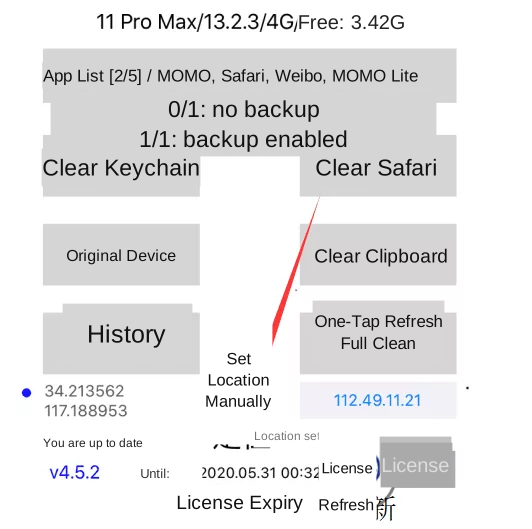
The Full Clean button at the bottom right creates a new device profile. The IP address and region below it describe the current internet connection. Below History, coordinates show either the IP-based location or the manually chosen location. The version and license expiry appear below the coordinates. The circular icon refreshes license information or opens activation code entry.
Settings
Language and random parameters
The guide lists English and Traditional Chinese interfaces. Model settings include iPhone 4S through iPhone 11 Pro Max, with regional variants for iPhone 7, 7 Plus, 8, 8 Plus and X (including A1863, A1906, A1905, A1864, A1897, A1865, A1902 and A1901). The legacy parameter list describes 79 iOS versions from 8.0 to 13.4, 67 carriers including China Mobile, China Unicom and China Telecom, and 2G, 3G, 4G and Wi-Fi network types.
Cleaning parameters
Options include backing up during cleaning and clearing jailbreak, VPN, network and carrier data. Screen simulation is generally not recommended: simulating a larger display on a smaller device may crop some apps. Simulating a smaller display on a Plus model may give better results.
Advanced options and location
Options include crash prevention when simulating newer system versions for games and smart airplane mode. Enable location simulation to use either IP-based location or a manually selected city. IP-based location overrides manual city selection. Set the location or change the IP before running Full Clean.
Import, export and file management
Export Backup Records and Import Backup Records transfer saved data. The original beta import/export feature does not support iOS 10.3.x. File Manager displays a local network address that can be opened in a browser to manage files. Additional options reload SpringBoard, restart the device (which may require jailbreaking again), and repair backup record permissions.
App List
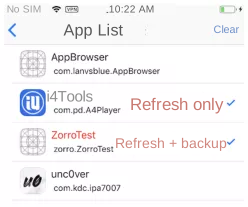
Tap an app once for a black check mark: refresh its environment without backing up its data. A later refresh will not preserve that app’s data for restoration. Tap twice for a red check mark: refresh and back up the app. Tap again to deselect it.
Home screen actions
Clear Keychain removes stored usernames, passwords and related credentials. Clear Safari clears Safari’s browser data. Original Device clears and restores the current backup parameters and cleans other apps on the device. Clear Clipboard removes clipboard contents. History contains saved parameters from Full Clean and full backups; selecting a record restores that environment.